


A work order request is a formal submission used to report a maintenance issue before work is approved. It captures the problem, location, and urgency, but does not authorize execution. The request must be reviewed and approved before becoming a scheduled work order.
Issues in plants and facilities are reported every day, but the way maintenance request intake process works determines whether maintenance stays organized or slips into constant reaction. Work order requests provide the formal starting point for capturing these issues, giving maintenance teams a controlled way to record demand before any decisions about action are made.
I have seen delays pile up when teams fail to distinguish between a work order request and a work order. In this article, I will explain why that distinction matters, how work order requests differ from work orders along with several other angles to comprehensively explain work order requests and their significance.
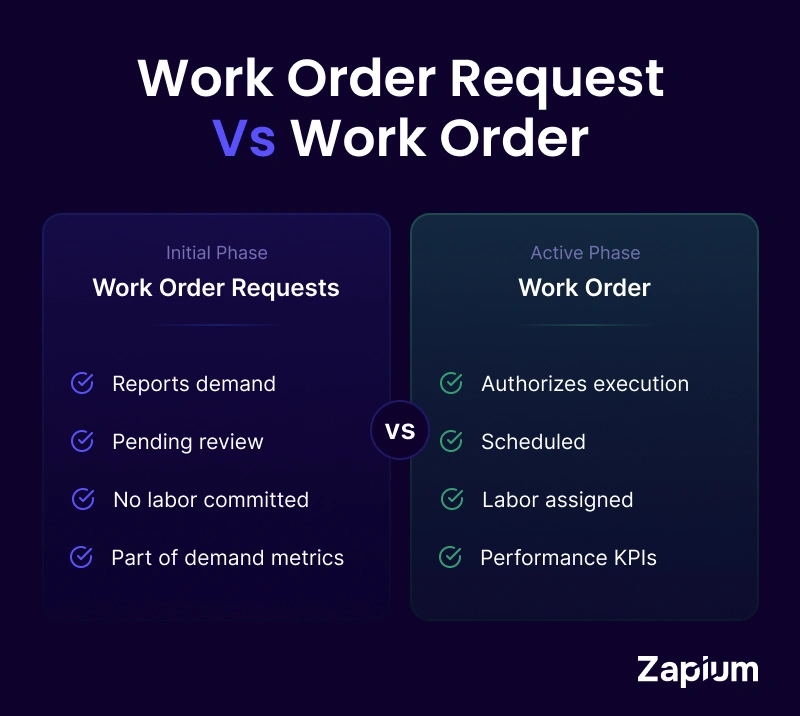
Quick Summary Table
| Element | Work Order Request | Work Order |
|---|---|---|
Purpose | Report issue | Execute work |
Status | Pending | Scheduled |
Authorizes Labor? | No | Yes |
Assigned Technician? | No | Yes |
Included in KPI Tracking? | Demand metrics | Performance metrics |
What Is a Work Order Request?
A work order request is a formal notification that something needs attention. In work order management, it signals a problem, an observation, or a requirement, but it does not authorize work to begin. In practical terms, it is how maintenance demand is captured before any decision is made about priority, resources, or timing.
Typically, a work order request is submitted by:
- Operators, when they notice changes in equipment behavior or performance during routine operation.
- Office staff or occupants, when facility issues begin to interfere with daily work conditions.
- Facility managers, based on walkthroughs, planned reviews, or observed infrastructure issues.
- Safety officers or inspectors, when hazards or non-compliant conditions are identified.
- Contractors or service vendors, when related issues are discovered while performing assigned work.
A work order request represents reported need, not approved action and is the first step in identifying maintenance issues. It captures a snapshot of a problem as seen by the requester.
Work Order Request vs Work Order
A work order request may be confused with a work order; however, both are different. One records demand, the other authorizes effort. The work order vs work request comparison is explained across the following parameters:
- Purpose
A work order request exists to report an issue or requirement and answers the question of what might need to be done. A work order exists to direct action and answers when, how, and by whom the work will be carried out.
- Status
A request is in a pending state and waits for review, clarification, or rejection. On the other hand, a work order is active. It is visible on schedules, assigned to technicians, and tracked through completion. That status difference matters because reporting, backlog visibility, and performance tracking depend on it. Mixing the two creates misleading metrics and false urgency.
- Approval Requirement
Work order requests require validation. Someone must confirm that the issue is real, relevant, and worth acting on. Work orders have already crossed that gate. They are approved, planned to some degree, and ready for execution. When this step is skipped, supervisors end up acting as dispatchers rather than leaders, constantly renegotiating what work actually matters.
The following table summarizes the difference between work order request and work order:
| Aspect | Work Order Request | Work Order |
|---|---|---|
Authority | Records demand but does not authorize any action. | Authorizes maintenance work to be executed. |
Purpose | Captures what might need attention based on an observed issue or requirement. | Directs when the work will happen, how it will be done, and who will do it. |
Status | Remains pending until reviewed, clarified, approved, or rejected. | Becomes active, scheduled, assigned to technicians, and tracked to completion. |
Approval | Requires validation to confirm the issue is real, relevant, and worth acting on. | Has already passed approval and is cleared for execution. |
Operational Impact if Misused | Creates noise and confusion when treated as approved work. | Loses planning discipline when created without proper request validation. |
A work order request becomes a work order only after it has been reviewed, approved, and placed on the schedule. Until that happens, it remains a record of reported demand, not a commitment to act. Approval confirms that the issue is valid and worth addressing, and scheduling assigns the work a time and place within the maintenance plan.
Why Work Order Requests Matter
I have consistently seen that organizations with a disciplined request stage face fewer disruptions during execution, and following are the impact areas:
- Operational Efficiency: Work order requests filter work before labor is committed, separating real needs from background noise. As a result, time and resources stay focused on tasks that genuinely deserve attention.
- Visibility and Tracking: Each request contributes to a growing picture of maintenance demand across assets and locations. Over time, the visibility supports more accurate forecasting and steadier resource planning. One metric that reflects intake discipline is the request-to-work order conversion rate, which measures how many submitted requests ultimately result in approved work. A consistently high conversion rate may indicate weak filtering, while an unusually low rate may signal unclear submission standards. These indicators eventually surface in broader work order KPIs, where backlog health, schedule adherence, and execution stability are measured.
- Prevents Unnecessary Assignments: Requests introduce a pause before technicians are pulled into action. Without this step, unapproved or loosely defined jobs tend to land on schedules and disrupt planned work.
- Supports Effective Planning: Early capture of issues gives planners room to evaluate impact and urgency. With that lead time, resource decisions are made deliberately instead of under pressure.
In many facilities, 20–35% of submitted requests are initially marked urgent, yet a significant portion are later reclassified after review. Organizations that implement structured triage often see a 15–25% reduction in emergency work over time, simply by filtering demand more effectively.
Without structured intake, organizations struggle with effective maintenance demand management, leading to schedule instability and reactive overload.
What Information Is Included in a Work Order Request?
Following are the essential information elements that a work order request includes to allow maintenance teams to review the need, validate its relevance, and decide the next steps without unnecessary back-and-forth.
- Requester Details The request records who submitted it along with their department or location and contact information. These details identify the source of the reported issue and establish where the observation originated.
- Issue Description A short explanation captures what problem was observed or what need triggered the request. The focus stays on describing the situation as seen, so reviewers can understand the issue without assumptions.
- Location/Asset Reference The request specifies the physical location or the specific asset affected by the issue. This information ties the request to a defined place or equipment within the facility.
- Urgency An urgency indicator reflects how quickly attention is expected based on perceived impact. It helps reviewers sort requests during triage while leaving final priority decisions with maintenance.
- Supporting Information Photos, notes, or inspection comments provide additional context. These details are important for reducing back-and-forth and help reviewers assess the request more accurately on the first pass.
How Does Work Order Request Process Work
A work order request moves through a defined sequence before any maintenance work is allowed to begin as explained below. Each step exists to record the need accurately, confirm its relevance, and formally authorize action in a controlled way.
- Request Submission The process starts when a maintenance issue or requirement is identified and formally logged through the approved channel, such as a CMMS form or a standardized request document. At this stage, the request captures the initial details provided by the requester without assigning priority or scheduling work.
- Review and Validation: The submitted request is examined by the designated authority to confirm that the information provided is complete and understandable. Details such as the issue description, location or asset reference, and urgency are checked, and clarifications may be requested if information is missing or unclear. This review stage functions as a formal request triage workflow, separating legitimate operational needs from incomplete, duplicate, or out-of-scope submissions.
- Approval or Rejection: After review, a decision is made on whether the request should move forward. If there is approval, it indicates the issue is valid and within maintenance scope, while rejection closes the request when it is unnecessary, out of scope, or cannot be acted upon as submitted.
- Conversion to Work Order: An approved request is formally converted into a work order within the system. During this step, the task becomes executable and is prepared for planning and scheduling according to maintenance procedures.
Common Examples of Work Order Requests
The examples below show how typical requests are raised, reviewed, and then converted into work orders once validated.
- Facility Issue Reported by Employee An employee reports that the breakroom HVAC is not cooling properly and submits a request with the location and observed issue. After review confirms the problem, the request is approved and converted into a work order for maintenance to investigate and correct the condition.
- Example 2: Equipment Issue Reported by Operator While running the line, an operator picks up on a conveyor belt that is not behaving as it should and submits a request describing the symptom. Maintenance reviews the request, confirms it warrants attention, and issues a work order so repairs can be planned.
- Example 3: Safety Concern Reported During Inspection During a scheduled inspection, a safety officer comes across a loose power cable that presents a clear hazard. The issue is documented through a request, reviewed quickly, and then converted into an urgent work order for corrective action.
- Example 4: Tenant Maintenance Request A tenant reports that a refrigerator has stopped working and submits a maintenance request through the agreed channel. Once the request is approved, a work order is created and scheduled to restore the appliance.
Types of Work Order Requests
Not all maintenance requests are created equal. The way a request is handled often depends on the nature of the issue, the level of risk involved, and the operational context in which it arises.
Over time, most organizations see patterns in the types of requests they receive. Understanding these categories helps route work correctly and apply the right level of review.
- General Maintenance Requests: These are the everyday requests that keep operations steady. They usually involve routine upkeep or minor repairs — adjusting equipment, replacing lights, fixing loose fittings, or resolving small mechanical issues. They typically do not pose immediate safety or production risks, but if ignored, they can gradually affect reliability. These requests often come from operators or staff who notice something slightly off during normal work.
- Facility Maintenance Requests: This category focuses on the building itself. Plumbing leaks, electrical faults, HVAC inconsistencies, damaged flooring, or structural concerns fall here. These requests usually originate from facility managers, office staff, or occupants who experience the issue firsthand. While some may be minor, others can quickly escalate if not addressed, especially when they affect comfort, safety, or compliance.
- Emergency Maintenance Requests: Emergency requests require immediate attention. They are triggered by conditions that pose safety risks, threaten production continuity, or create regulatory exposure. A critical motor failure, a significant water leak, or exposed wiring would fall into this category. These requests often bypass the standard review queue, but even then, they should still be logged properly to maintain visibility and historical tracking.
- Inspection or Safety Requests: These requests arise from formal inspections, audits, or safety walkthroughs. They document hazards, non-compliance issues, or early warning signs that may not yet have caused failure. While they may not always feel urgent, they are important because they protect the organization from long-term risk. Addressing them proactively often prevents more serious incidents later.
- IT or Equipment Maintenance Requests: In many organizations, maintenance extends beyond mechanical assets. Issues with computers, printers, network systems, or specialized office equipment fall into this category. These requests are typically routed to technical support or IT teams rather than general maintenance staff. Clear categorization helps ensure the right expertise handles the issue from the start.
Recognizing these different types of work order requests helps organizations apply the right level of urgency, review, and routing. When everything is treated the same, either emergencies get delayed or minor issues get over-prioritized. Clear classification keeps the workflow balanced and predictable.
Work Order Request Templates and Forms
In many facilities, the quality of maintenance planning can be traced back to one simple question:
“How well do we capture requests?”
A work order request template may look like a basic form, but in practice, it shapes the clarity of communication between operations and maintenance. A well-designed template does more than collect information — it prevents guesswork, reduces back-and-forth, and protects planning time.
Without structure, requests come in scattered formats: quick emails, hallway conversations, handwritten notes, or short messages with barely enough detail to act on. Templates bring consistency. They define what must be recorded so every request can be reviewed, validated, and converted into a work order in a controlled manner.
A structured digital work request system centralizes submission, validation, and routing, replacing scattered emails and verbal reporting with controlled intake.
Over time, that consistency makes a measurable difference.
1. Common Work Order Request Templates: Templates vary depending on the type of work being requested. Some examples of request form templates are:- General Maintenance Request Template: For routine repairs.
- Emergency Maintenance Request Form: For urgent issues requiring immediate attention.
- IT Maintenance Request Template: For equipment and technology-related issues.
- Facility Maintenance Request Form: For building infrastructure issues like plumbing or electrical.
- Requester details
- Issue description
- Asset/location reference
- Urgency level
- Supporting documentation or photos
When these fields are consistently required, review becomes faster and planning becomes more accurate. It reduces follow-up questions and prevents technicians from arriving unprepared.
3. Where to Find Work Order Request Templates: Most organizations build templates directly into their CMMS or maintenance system so requests are logged, routed, and tracked automatically. Others use standardized forms stored internally. The format matters less than the discipline. A consistently used template keeps maintenance intake organized and protects planning time over the long term.Most modern platforms include a dedicated CMMS request module that standardizes intake fields, enforces mandatory asset tagging, and automates review routing.Common Mistakes in Work Order Requests
I have noticed that these mistakes do not appear serious at first, but over time they quietly weaken planning discipline and backlog visibility. Following are some of the most frequent mistakes seen in work order requests, which can disrupt workflow, delay maintenance, and create confusion in day-to-day operations.
- Mistaking Requests for Approved Work: Assuming a request is automatically authorized causes teams to act before validation. It disrupts scheduling and creates conflicts in workload management.
- Incomplete Requests: When key details like asset, location, or urgency are missing, reviewers cannot assess the issue properly, which delays approval and subsequent action.
In practice, incomplete requests frequently extend review cycles by 24–48 hours because planners must seek clarification. Over time, these small delays compound and contribute to request backlog aging.
When review discipline weakens, the maintenance request backlog begins to age, reducing visibility into true demand patterns.
- Marking All Requests as Urgent: Labeling every request as high priority distorts the real work queue, and makes it harder to identify which tasks truly need immediate attention.
- Loss of Request History: Failing to track or archive past requests removes valuable context, which over time, results in repeated issues or overlooked maintenance needs.
Individually, these mistakes feel manageable. Collectively, they blur the line between demand and commitment. And once that line is blurred, maintenance slowly shifts from controlled planning to constant adjustment.
When does a Work Order Request Become a Work Order?
A work order request does not become a work order simply because it was submitted. The transition should be deliberate. It marks the point where reported demand turns into committed action within the structured work order process, where planning, scheduling, and execution controls formally apply.
In structured maintenance environments, conversion happens only after the issue is reviewed, prioritized, and prepared for execution.
Following are the typical conditions under which a work order request transitions into a work order:
- Approval Trigger: After review, the request is confirmed as valid and relevant to maintenance scope. This is a point where the issue is recognized as actionable and moves forward for planning. A clearly defined request approval workflow prevents automatic conversion and protects planning discipline.
- Priority Assignment: Once approved, the task is evaluated for urgency and operational impact. A priority level is set to guide how quickly it should be addressed relative to other work.
- Planning: The maintenance team assesses what resources, materials, and personnel are required for the job. It is defined what is needed before the work can be scheduled and executed.
- Scheduling: The work order is scheduled for execution based on technician availability and job priority and the task is set into the maintenance calendar for execution.
The moment a request is scheduled, it stops being reported demand and becomes organizational responsibility. Handling that transition carefully is what separates controlled maintenance operations from reactive ones.
In structured environments, clearly defined approval and scheduling gates help prevent unnecessary workload expansion. Teams that formalize this transition often report measurable improvements in schedule adherence and backlog stability within a single planning cycle.
Frequently Asked Questions (FAQs)
What is a work order request?
A work order request is a formal submission that records a maintenance need. It captures details such as the problem, location, and urgency, and helps maintenance teams review and act systematically..What is the difference between a work order request and a maintenance request?
A work order request and a maintenance request are generally the same concept: both are used to report an issue before work is approved. The key difference is between a request and a work order. A request captures demand, while a work order authorizes labor, scheduling, and execution.
Can a work order be created without a request?
Yes, a work order can be created without a formal request, especially during urgent breakdowns. However, skipping the request stage reduces visibility into maintenance demand and weakens backlog control. Most structured maintenance systems still log the issue first to preserve traceability and reporting accuracy.
Who approves a work order request?
A work order request is typically approved by a maintenance planner, supervisor, or reliability manager. The approver confirms that the issue is valid, within maintenance scope, and worth allocating resources to. In some organizations, approval authority may vary depending on cost limits or asset criticality.
What happens if a request is rejected?
If a work order request is rejected, it is usually documented with a reason such as duplication, incomplete information, or being outside maintenance scope. Rejection does not mean the issue is ignored; it ensures that work is properly filtered and routed before labor and materials are committed.
What fields are required in a work order request form?
Most work order request forms require the requester’s details, a clear description of the issue, the affected asset or location, and an urgency level. Many organizations also require supporting photos or notes to reduce clarification delays and improve the accuracy of review and planning decisions.