Make More Informed Sourcing Decisions: Save Costs and Time
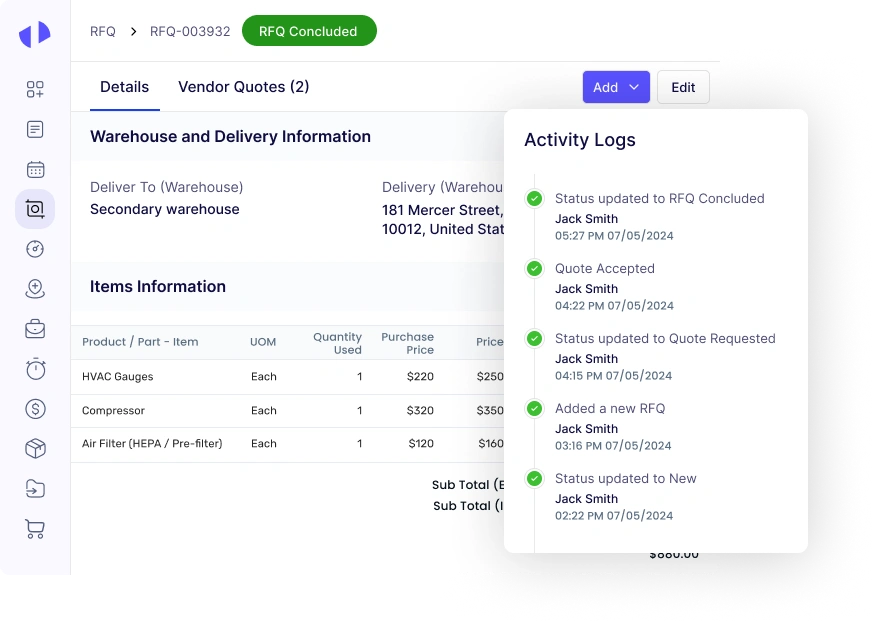
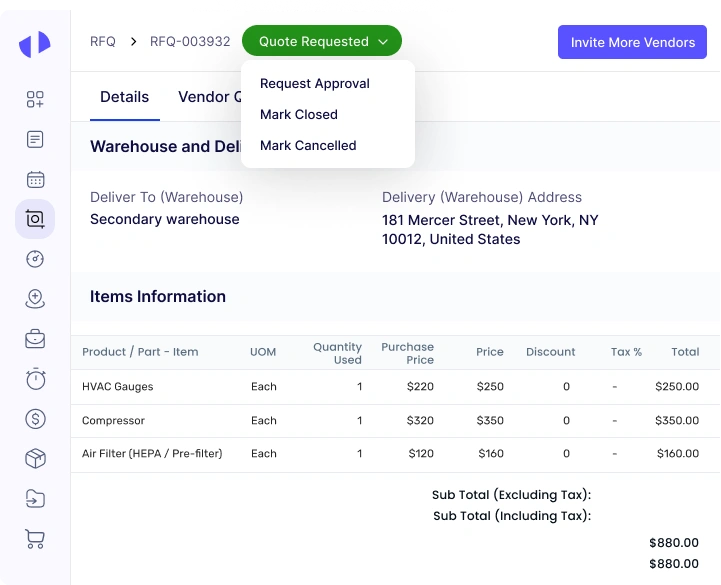
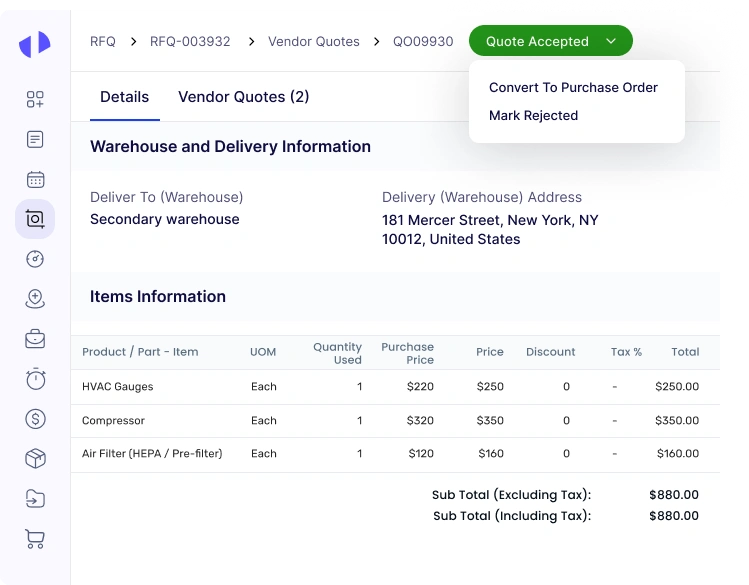
Bid a farewell to cumbersome documentation and communication gaps by embracing Zapium’s first-rate RFQ software, offering new direction to your RFx ecosystem. Infused with automation features, our application is a powerful tool to refine your existing procurement workflows. Eliminating risks of errors, it offers a swift purchase workflow, brings in transparency, and supports businesses in achieving greater agility and reliability in their procurement operations.
Powering Maintenance for Industry Leaders Worldwide
How does RFQ Software Work?
Explore how the key features work without signing up for a trial or demo.
01
User Login and Access
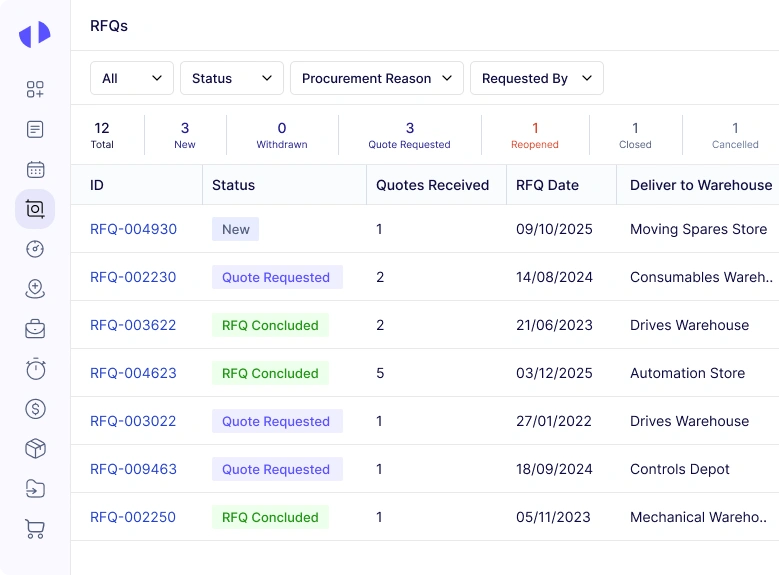
Users begin by logging into the RFQ software with secure credentials. Once logged in, they can navigate through the software’s dashboard to initiate new RFQs or manage existing ones.
02
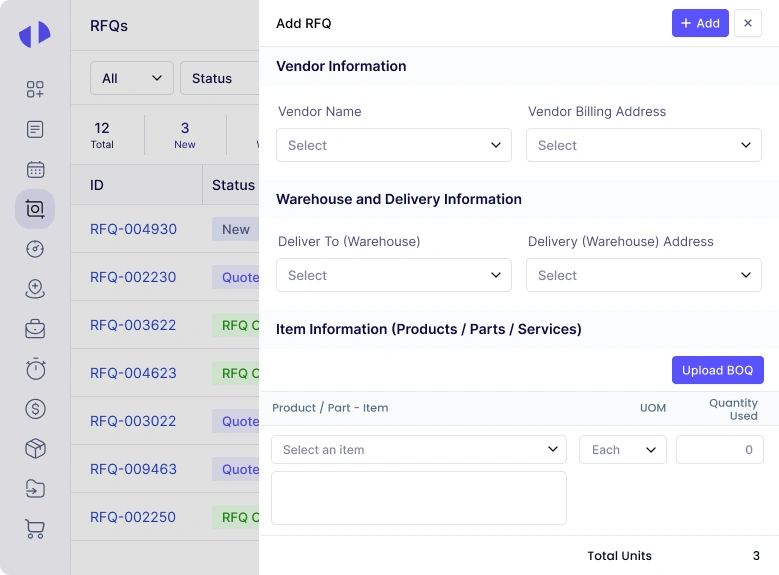
Requirement Specification
Users specify the requirements for the goods or services they need. They fill out detailed forms, specifying the type of product or service, quantities, specifications, delivery dates, and any special conditions.
03
Template Selection and RFQ Document Creation
The software provides pre-defined templates for RFQ documents, which users can select and customize as needed. You have to enter the required details into the template, including descriptions, quantities, and any additional terms. Attachments like technical drawings or specifications can be uploaded to the RFQ document.
04
Supplier Selection and Invitation
Users select potential suppliers from an integrated database within the software. The RFQ software allows filtering suppliers based on criteria such as past performance, location, or product category. Invitations to participate in the RFQ are sent to selected suppliers via automated emails generated by the software, so that all invited suppliers receive the RFQ details promptly.
05
Quotation Submission Portal
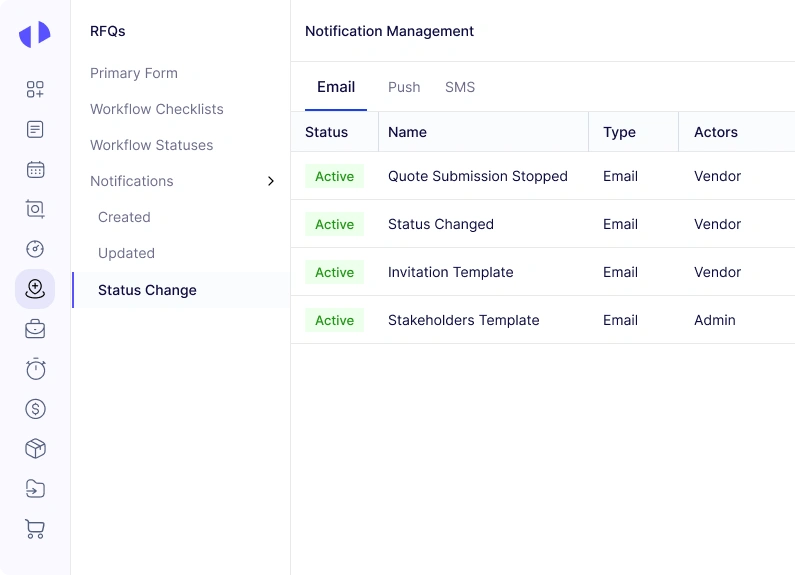
It guides suppliers through the submission process, so that they provide all required information in a standardized format. It also sends automatic reminders to suppliers about upcoming deadlines.
06
Quotation Aggregation and Comparison
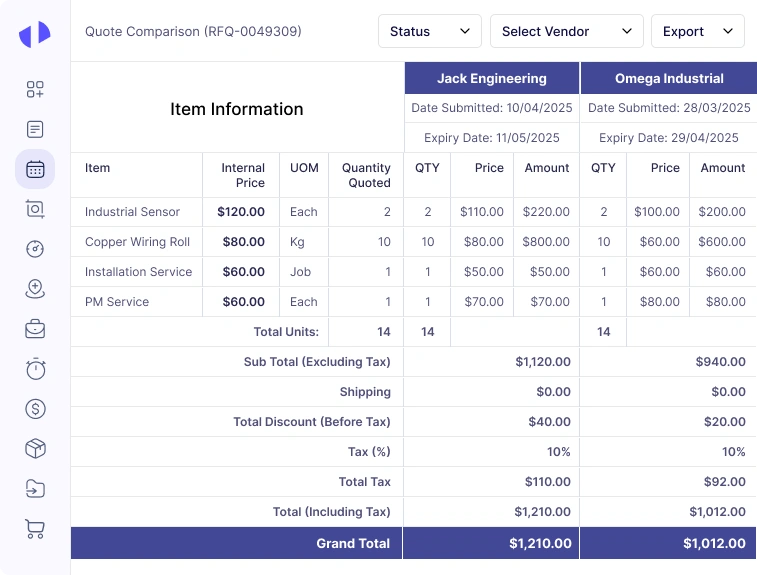
Once suppliers submit their quotations, the software aggregates all responses into a comparative format. With this response management mechanism, users can view a side-by-side comparison of prices, delivery timelines, and other key criteria.
07
Clarifications and Negotiations
If clarifications or negotiations are needed, the software facilitates direct communication between the buyer and suppliers. The tool allows for sending messages, requesting additional information, or even asking for revised quotations.
08
Supplier Selection and Approval Workflow
Based on the aggregated data and analysis, users select the preferred supplier(s). There is an approval workflow, requiring internal stakeholders to review and approve the selection before finalizing it.
09
Contract Award and Notification
The software generates notifications to inform the selected supplier(s) of the award and provides updates to those who were not selected. It also helps in the creation of contracts or purchase orders based on the terms agreed upon in the RFQ process.
10
Post-Award Management and Reporting
After awarding the contract, the software helps track supplier performance and contract compliance. You can generate reports on various metrics such as supplier responsiveness, quotation accuracy, and delivery performance.
Zapium’s RFQ software automates many of the manual processes involved in creating, sending, and managing
requests for quotations, leading to substantial time savings for procurement teams and allowing them to
focus on higher-value tasks.
Slash Costs with Competitive Bidding
Through competitive bidding and transparent pricing, our RFQ management software helps businesses obtain
better prices for goods and services, reducing procurement costs and supporting spend management goals.
Hit the Bullseye
Automated data entry and standardized templates minimize errors in RFQ documents, ensuring all necessary
information is accurately captured and communicated to suppliers, which reduces misunderstandings and
discrepancies.
Stay Compliant and Manage Risks Like a Pro
Zapium’s RFQ software helps maintain compliance with procurement policies and regulations, and provides
tools for risk assessment and mitigation through clear audit trails.
Master Supplier Management
Our RFQ software includes features for managing supplier information, performance tracking, and
communication, making it easier to maintain up-to-date records and assess supplier capabilities and
reliability.
Harness the Power of Data-Driven Decision Making
Robust analytics and reporting capabilities enable procurement teams to make informed decisions, improving
negotiation strategies and supplier selection.
Scale Your Operations Seamlessly
As businesses grow, our tool scales to accommodate increased procurement activity, ensuring the
procurement process remains efficient and effective regardless of operation size.
Why Choose Zapium For RFQ Software?
Comprehensive yet Easy-to-use System
Our RFQ software offers a robust feature set designed for simplicity, ensuring all users can navigate and
utilize its full capabilities efficiently.
Personalized Onboarding & Training
Our dedicated team provides personalized onboarding and training sessions, ensuring your staff quickly
adapt to and leverage the full potential of our RFQ software.
Highly Configurable and Customizable
Tailor our RFQ software to fit your unique business processes perfectly, ensuring seamless integration and
maximum operational efficiency.
Top-rated Support Team
Access our top-rated support team for prompt assistance and expert guidance, ensuring uninterrupted
operation and resolving any queries or issues swiftly.
Proven and Trusted by Industry Leaders
Trusted by leading companies across various industries, our RFQ software consistently delivers reliable
performance and results, making it a preferred choice.
Compliant and Best Security Practices
Rest assured with our RFQ software that adheres to industry standards for security and compliance,
safeguarding your sensitive data and transactions effectively.
Revolutionize procurement in manufacturing by automating supplier management, optimizing supply chains,
and ensuring just-in-time delivery of raw materials and machinery components, all while adhering to
industry-specific quality standards.
Simplify the procurement process for medical supplies and equipment, ensure compliance with regulatory requirements, manage complex inventory needs, and enable seamless vendor communication to support patient care excellence.
Empowers your team to source a wide range of products while managing costs, ensuring timely delivery, and maintaining high-quality standards for meeting dynamic consumer demands.
Streamline procurement of ingredients, packaging materials, and equipment; ensure traceability, manage supplier certifications, and support compliance with food safety regulations to safeguard product integrity and consumer trust.
Efficiently handle complexities of sourcing aircraft parts and services; integrate with maintenance schedules, manage compliance documentation, and support rigorous quality assurance to ensure safety and reliability in aviation operations.
Automate procurement of vehicles, parts, and maintenance services; minimize downtime, negotiate favorable contracts, and ensure compliance with safety and environmental standards.
Seamlessly procure educational materials, technology solutions, and facility maintenance services; simplify budget management and ensure educational quality through efficient supplier management.
Construction
Streamline procurement of materials, subcontractor services, and equipment; manage bid processes, ensure timely deliveries, and maintain cost control while adhering to industry regulations and safety standards.
Optimize procurement of equipment, materials, and maintenance services critical for infrastructure reliability; support sustainability goals and manage supplier performance to maintain operational continuity.
Streamline purchasing processes while ensuring transparency and compliance with government regulations; improve supplier diversity, manage contract lifecycles, and support efficient community spending.
Streamline procurement of specialized equipment and safety gear; integrate with mining schedules and manage inventory levels to support efficient, secure operations.
Manage procurement of critical equipment, materials, and services; support complex supply chain logistics and adherence to industry standards and safety protocols.
Effectively source active ingredients, lab equipment, and packaging; manage supplier certifications and quality control processes essential for pharmaceutical manufacturing.
Simplify procurement of hotel supplies, food and beverage items, and maintenance services; optimize supplier relationships and workflows to maintain high hospitality standards.
Reengineer procurement of technology solutions, security services, and operational supplies; manage vendor risk and support cost-effective procurement strategies for financial institutions.
Simplify sourcing of food ingredients, kitchen equipment, and dining supplies; optimize supplier relationships, manage inventory, and support menu innovation while ensuring food safety.
Enhance procurement while adhering to budget constraints and donor requirements; improve transparency, facilitate ethical partnerships, and maximize resources for social impact.
Designed for zoo and animal care facilities, our RFQ software improves procurement of animal care supplies, veterinary services, and maintenance equipment.
Simplify procurement of fitness equipment and wellness products; manage supplier relationships to improve operational efficiency for fitness businesses.
Streamline procurement of cleaning supplies and equipment; improve relationships between providers and businesses and reduce costs for required supplies.
Simplify procurement of plants, materials, and equipment for landscape projects; manage suppliers and support environmental sustainability through efficient resource management.
Improve procurement workflows for plumbing materials, fixtures, and maintenance services; ensure compliance with building codes and support reliable water and sanitation solutions.
What Our Customers Say About Our RFQ Software
Zapium’s CMMS has helped our 120+ location assisted living operations move from scattered maintenance processes to a more organized, system-driven process. We can now understand priorities, identify where work is building up, and make more informed decisions faster.
Darcy Rice
Facility Maintenance Director – Rock House
For the first time, we can see what’s happening across all our communities without chasing updates.
Earlier, our operations team relied on fragmented updates from stores and vendors. After implementation of Zapium’s multi-store CMMS for restaurants, they gained centralized control over every location.
Jersey Mike’s
Franchise CEO
We no longer rely on store calls to know something is broken. We see it as it happens.
Zapium’s product team worked with optimizing their system to our workflows to manage ops, inventory, vendor and internal ops team. Their CMMS with field team capabilities has been super helpful in running our operations seamlessly.
Shubha Lal
COO and Co-founder – Yourspace
Productivity Increased
23%
Inventory pilferages by
8%
Tenant experience & resolution
30%
Zapium’s CMMS for our coliving ops redefined how we capture and analyze operational insights.
Zapium’s asset management and CMMS have been critical to our audit operations processes. We now have complete clarity on our client’s asset registry, breakdown data, cost-related insights, and total cost of ownership.
Narayan Kella
Partner – RNCA
This standardization allows us to benchmark asset condition across clients, identify outliers, and make data-driven recommendations on maintenance investment priorities based on asset audit processes.
Discover the remarkable impact of Zapium as our trusted clients share their success stories and client feedback on how
they have transformed their service operations.
Cushman & Wakefield
Cushman & Wakefield improves customer experience, profitability, and vendor collaboration using Zapium
See how Zapium helps facility services companies manage work orders, PM, vendors, and compliance across every client — from one connected platform.
Walkthrough tailored to your industry and setup
QR codes live — reporting from day one
OSHA flow and CMMS integration covered
Book a 15 mins walkthrough
Frequently Asked Questions (FAQs)
Quick answer to questions you may have.
How do I get started with RFQ software?
Getting started with our RFQ software is designed to be straightforward. Begin by assessing your current RFQ process and identifying pain points or areas for improvement. Next, reach out to our team to schedule a demo and discuss your specific requirements. Once you’ve availed the free trial and chosen our software, our implementation team will guide you through the setup process, and integrate with your existing systems.
Is Zapium’s RFQ software difficult to implement?
Implementing RFQ software can vary in complexity depending on your organization’s needs and the software provider you choose. But overall, our RFQ software is designed with user-friendliness in mind, and we offer robust implementation support to streamline the process. Our team will work closely with your stakeholders to understand your RFQ workflow and configure the software to align with your business processes.
How much does Zapium’s RFQ software cost?
Our RFQ software pricing is flexible and tailored to meet the diverse needs of our clients. We offer different pricing plans based on factors such as the size of your organization, the number of users, and the specific features you require. To get a precise quote that aligns with your budget and requirements, we encourage you to contact our sales team.
Can Zapium’s RFQ software handle international suppliers and currencies?
Yes. Our RFQ software is designed to support global procurement needs, including handling international suppliers and multiple currencies. It is capable of managing supplier relationships across borders, executes currency conversions where necessary, and ensures that your procurement processes remain efficient and compliant on a global scale.
How secure is RFQ software in terms of data protection and confidentiality?
Security is a top priority for us. Our RFQ software employs state-of-the-art encryption methods to protect your data both in transit and at rest. We implement strict access controls and adhere to industry-leading standards for data security and confidentiality. As a result, your sensitive information, including RFQs and supplier data, is safeguarded against unauthorized access or breaches.
Does Zapium’s RFQ software offer mobile access or a mobile app?
Yes, our RFQ (request for quotation) software offers both mobile-friendly interfaces and dedicated mobile apps for iOS and Android platforms. Your procurement team can manage RFQs, communicate with suppliers, and track procurement activities conveniently from their smartphones or tablets.
Schedule a Demo
By submitting your details, you agree that we may contact you by call, email, and SMS and that you have read our terms of use and privacy policy.
Start Free Trial
In order to provide you a more personalised experience, we use cookies. To learn more about it, you may check our privacy policy.