Job Scheduling Software
Schedule in Minutes, Not Hours: In a More Efficient, Cost-Effective Way
Powering Maintenance for Industry Leaders Worldwide


How Job Scheduling Software Works?
01
User Login
The user login functionality serves as the gateway to the job scheduling software, ensuring secure access for authorized personnel. Users, whether managers, dispatchers, or technicians, input their unique credentials to gain entry to the software’s dashboard. This login process safeguards sensitive data and ensures that only authorized individuals can interact with the system.
02
Dashboard Overview
The dashboard overview provides users with a comprehensive snapshot of all pertinent information related to ongoing tasks, appointments, and assignments. Users can quickly assess job statuses, upcoming deadlines, assigned resources, and customer details at a glance. This centralized hub facilitates efficient decision-making by presenting critical data in an organized and easily digestible format.

03
Creating Jobs/Work Orders
04
Scheduling Jobs
05
Assigning Tasks
Assigning tasks involves allocating specific responsibilities to individual technicians or teams based on their expertise and workload capacity. Through the software’s interface, dispatchers can distribute tasks efficiently, ensuring that each technician receives assignments tailored to their skillset and availability. By assigning tasks systematically, the software promotes equitable workload distribution and minimizes the risk of resource overload or underutilization.
06
Dispatching and Routing
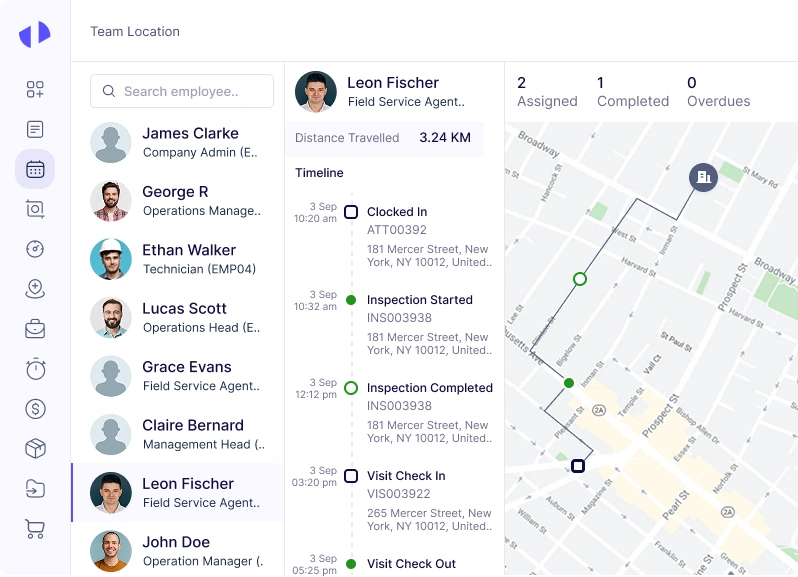
Dispatching and routing functionality optimizes technician routes to ensure efficient travel between job sites. The software generates optimized routes based on factors such as job location, traffic conditions, and technician availability. Dispatchers can monitor technicians’ locations in real-time and make adjustments to routes as needed to accommodate unforeseen circumstances or last-minute changes.
07
Job Execution
Job execution encompasses the process of technicians completing assigned tasks onsite, following detailed instructions provided through the software. Technicians receive task descriptions, customer information, and any relevant documentation via the software or a connected mobile app. They update job statuses, record work hours, and capture additional information or photos as needed, ensuring accurate documentation of work performed.
08
Real-time Updates
Real-time updates provide dispatchers and managers with instantaneous visibility into job statuses and any issues encountered during task execution. As technicians progress through their assignments, the software delivers real-time notifications and updates, ensuring stakeholders remain informed and can respond promptly to evolving situations.
09
Completing Jobs
Completing jobs involves updating job statuses within the software upon task conclusion, indicating the work’s completion and any additional notes or comments. Customers may provide feedback or sign off on completed work directly through the software, facilitating a streamlined approval process. By centralizing job completion procedures, the software ensures consistency and accuracy in documentation, fostering accountability and customer satisfaction.
10
Invoicing and Billing
Invoicing and billing functionality automates the generation of invoices based on predefined billing rates, labor hours, materials used, and any additional charges. Invoices are sent to customers via email or made available for download through the software’s customer portal. The software tracks payment statuses and sends reminders for overdue invoices if necessary, streamlining the billing process and improving cash flow management.
11
Reporting and Analytics
Reporting and analytics capabilities provide managers with comprehensive insights into key performance metrics such as job completion rates, technician efficiency, and customer satisfaction. Through customizable reports and dashboards, managers can analyze data trends, identify areas for improvement, and make data-driven decisions to optimize operations.
What are the Key Features of Job Scheduling Software
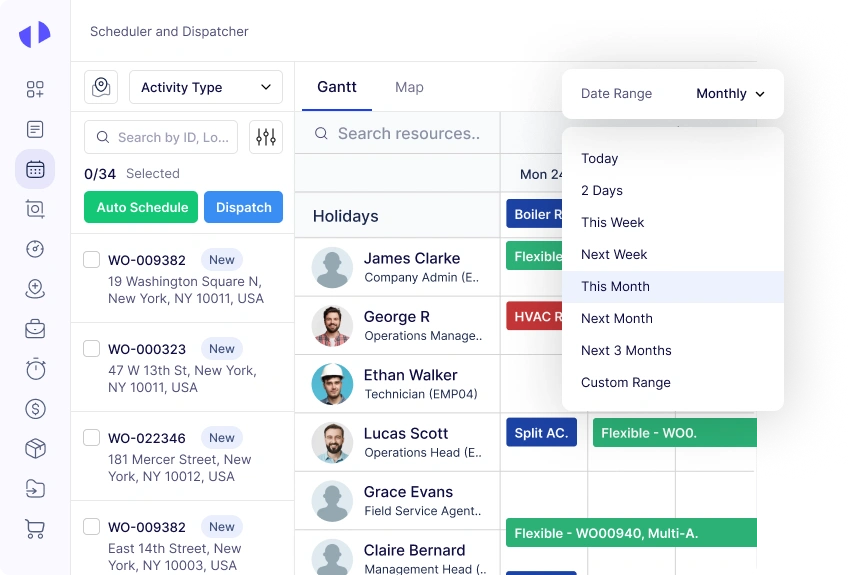
Plan Jobs Clearly With Easy Calendar Views
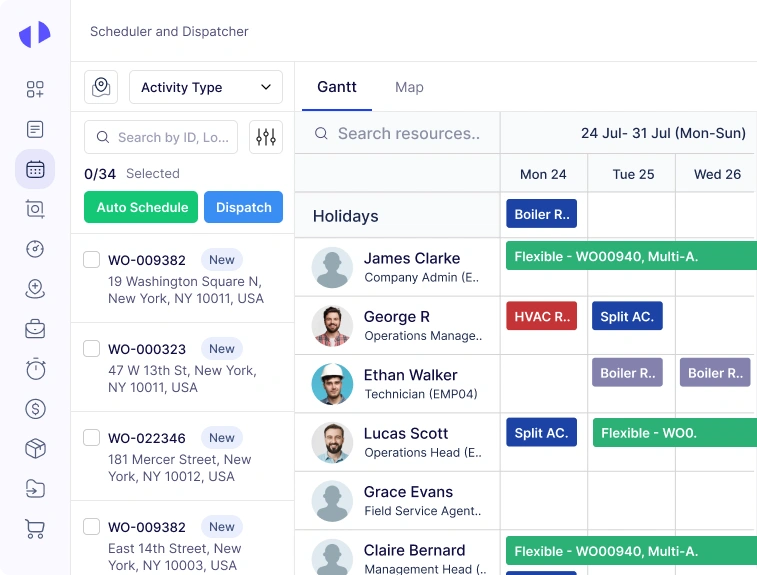
- Plan jobs using daily, weekly, or monthly calendars
- Drag and drop tasks to adjust schedules easily
- View technician load in a single screen
- Reduce scheduling conflicts and overlaps
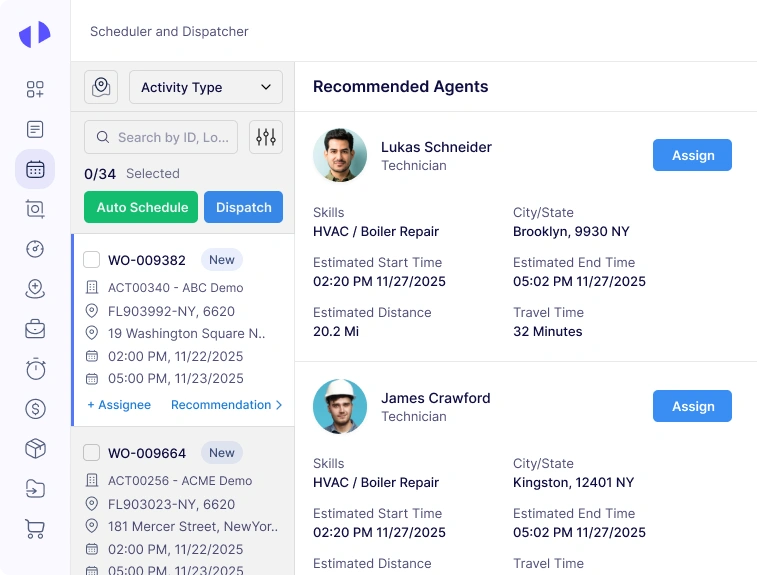
Match Every Job With the Right Skills
- Match jobs with technicians who have required skills
- Filter by certifications, experience and job type
- Improve first visit job success
- Ensure compliance with skill-based tasks
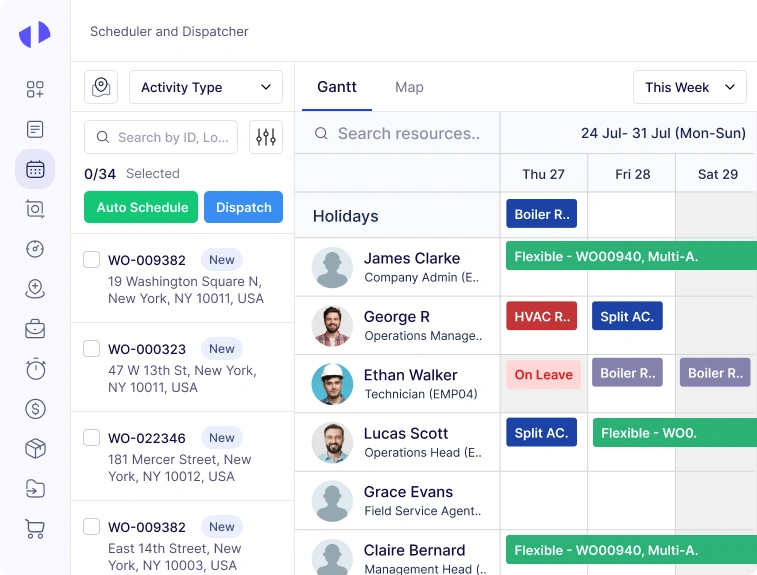
Plan Jobs Around Actual Technician Capacity
- View technician shifts, leave and real-time availability
- Identify free time slots instantly
- Prevent overbooking or double assignments
- Build accurate schedules for every shift
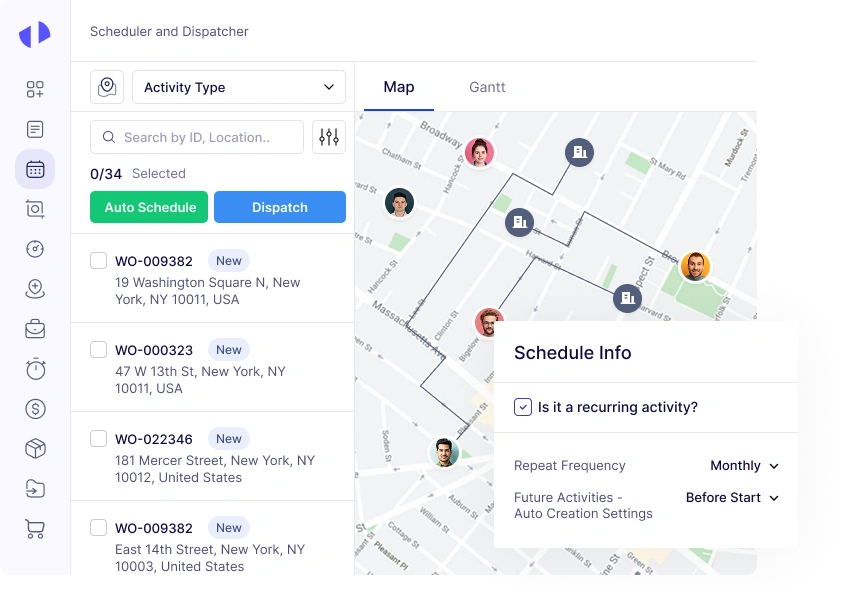
Reduce Travel Time With Smarter Job Routing
- Assign jobs based on proximity and travel time
- Reduce drive time and fuel cost automatically
- Replan routes when schedules change
- Improve on-time arrival performance
Auto-Assign Jobs Using Smart Scheduling Rules
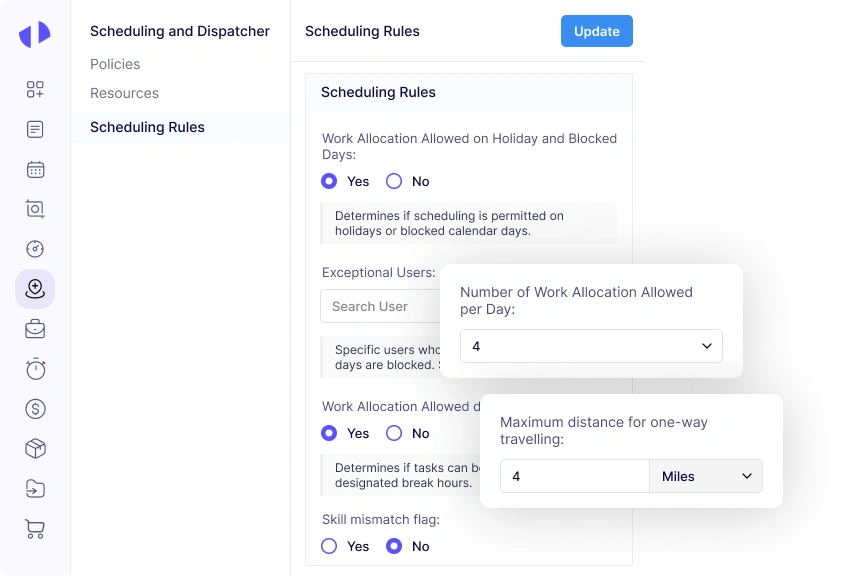
- Auto assign jobs using rules for skills, region and priority
- Fill schedule gaps automatically
- Balance workload across teams
- Reduce manual scheduling effort
Schedule Large Job Sets in One Click
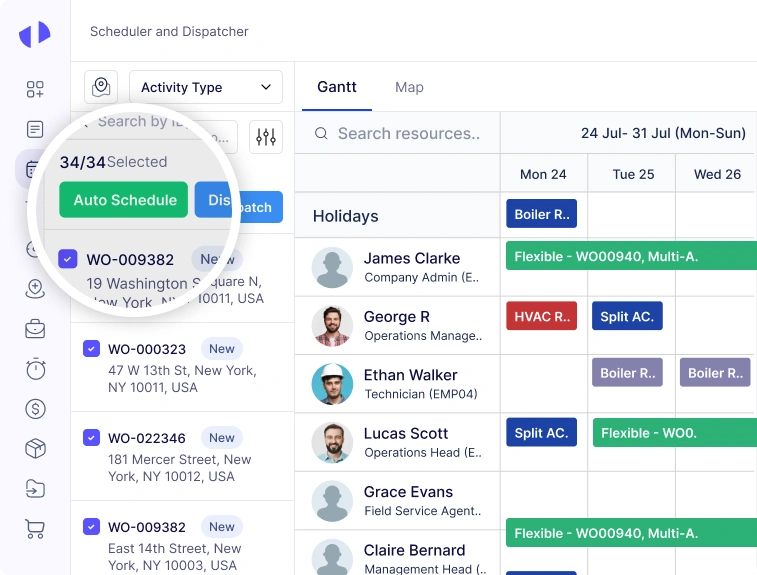
- Schedule multiple jobs in a single action
- Apply common rules or timing in bulk
- Save hours on large PM or inspection tasks
- Improve planning for recurring work
Track Every Job From Start to Finish
- Track job acceptance, arrival and completion
- Monitor delays and in-progress tasks in real-time
- Get instant updates from technicians
- Maintain complete visibility across schedules
Measure Scheduling Efficiency With Insightful KPIs
- Track on-time arrival and schedule adherence
- View technician utilization and workload metrics
- Analyze job distribution and bottlenecks
- Support planning with actionable scheduling insights
The Impact of Zapium’s Job Scheduling Software
01
Turbocharge Your Team’s Productivity
02
Optimize Your Resources for Peak Performance
03
Minimize Downtime, Maximize Efficiency
04
Deep Dive into Performance: Make Every Second Count
05
Elevate Customer Satisfaction to New Heights
06
Streamline Your Workflow for Unmatched Efficiency
07
Centralize Processes for Seamless Operations
Job Scheduling Software offers a centralized platform feature that allows for all scheduling-related processes to be managed from a single point. The benefits of this unified system include reduced errors, easier access to information, and improved communication. By centralizing processes, businesses can streamline operations, enhance collaboration, and achieve seamless coordination across departments, leading to smoother and more efficient operations.
08
Fortify Your Scheduling with Top-Tier Security
Why Choose Zapium For Job Scheduling Software?
Comprehensive yet Easy to use System
Personalized Onboarding and Training
Highly Configurable and Customizable
Top-rated Support Team
Proven and Trusted by Industry Leaders
Compliant and Best Security Practices
Rest assured that your data is secure with our Job Scheduling Software. We adhere to industry-standard security protocols, implement robust data encryption methods, and conduct regular security audits to protect sensitive information. With us, you can have peace of mind knowing that your data is safeguarded against unauthorized access, ensuring compliance with the highest security standards and best practices in the industry.
Industries That Can Benefit From Our Job Scheduling Software
Construction
Our software ensures efficient public service management in government agencies and municipalities. With features for scheduling public works projects, coordinating service requests, and managing municipal staff schedules, our Job Scheduling Software helps government organizations optimize resource allocation, improve service delivery, and enhance civic engagement.
What Customers Have To Say About Our Job Scheduling Software
Zapium’s CMMS has helped our 120+ location assisted living operations move from scattered maintenance processes to a more organized, system-driven process. We can now understand priorities, identify where work is building up, and make more informed decisions faster.
For the first time, we can see what’s happening across all our communities without chasing updates.
Earlier, our operations team relied on fragmented updates from stores and vendors. After implementation of Zapium’s multi-store CMMS for restaurants, they gained centralized control over every location.
Zapium’s product team worked with optimizing their system to our workflows to manage ops, inventory, vendor and internal ops team. Their CMMS with field team capabilities has been super helpful in running our operations seamlessly.
Zapium’s asset management and CMMS have been critical to our audit operations processes. We now have complete clarity on our client’s asset registry, breakdown data, cost-related insights, and total cost of ownership.
Narayan Kella
The Right CMMS for Our Business. Transformed the way we manage service requests and tickets now.
Businesses that Trust Us for Job Scheduling Software
Cushman & Wakefield
Cushman & Wakefield improves customer experience, profitability, and vendor collaboration using Zapium
Yourspace
YourSpace partners with Zapium to achieve service operations excellence leading to higher profitability and customer experience.

Nicco Engineering
Speciality maintenance service provider achieves more agile, transparent, and resilient service operations with Zapium.

TSI Power
Security & Privacy
Secure and Ready to Help You Scale
Top-rated on G2 for great customer support
Based on 150+ reviews
Secure, Trusted and Ready to Help You Scale
Designed with security at its core, enabling seamless and confident scaling as your operations grow.
Top-rated on Capterra for Ease-of-use
Based on 100+ reviews
Frequently Asked Questions (FAQs)
What is Job or Employee Scheduling Software?
Does Zapium’s Scheduling Software Offer Integration?
What Are The Benefits Of Job Scheduling Software?
Job scheduling software offers a multitude of benefits for businesses of all sizes across various industries:
- Improved Efficiency: Automating the scheduling process reduces time spent on manual scheduling tasks, allowing managers to focus on strategic decision-making and business growth.
- Optimal Resource Allocation: By matching job requirements with employee skills and availability, scheduling software ensures that the right resources are deployed effectively, minimizing underutilization and maximizing productivity.
- Enhanced Communication: Real-time updates and notifications keep employees informed about schedule changes, reducing confusion and improving overall communication within the organization.
- Increased Employee Satisfaction: Empowering employees with more control over their schedules, such as shift swapping and time-off requests, boosts morale and enhances job satisfaction.
- Cost Savings: Efficient scheduling reduces overtime costs, minimizes labor expenses, and optimizes resource utilization, leading to significant cost savings for the organization.
Is There Any Limitation On the Number Of Employees I Can Schedule?
Can Zapium Help Schedule Meal And Rest Breaks?
Book a Personalized Demo
Learn how your businesses can use Zapium to achieve more efficient, transparent, and profitable service operations.