School Maintenance Software

Increase Transparency and Efficiency, and Reduce Operations Cost

For schools striving to create the perfect learning environment, the well-being of facilities, teachers, and staff is non-negotiable, which translates to the need for maintenance management software in educational facilities. By implementing Zapium’s school maintenance software, you build a conducive learning environment for students and a hassle-free workspace for teachers and staff. From eliminating classroom disruption, providing a safer school environment, and more time for staff and teachers, our school maintenance tool assists you create an ecosystem that stresses educational priorities.

Powering Maintenance for Industry Leaders Worldwide

How School Maintenance Software Works?

Explore how the key features work without signing up for a trial or demo.

Key Features of Our School Maintenance Software that Unlock Efficiency

Customer and Location Management

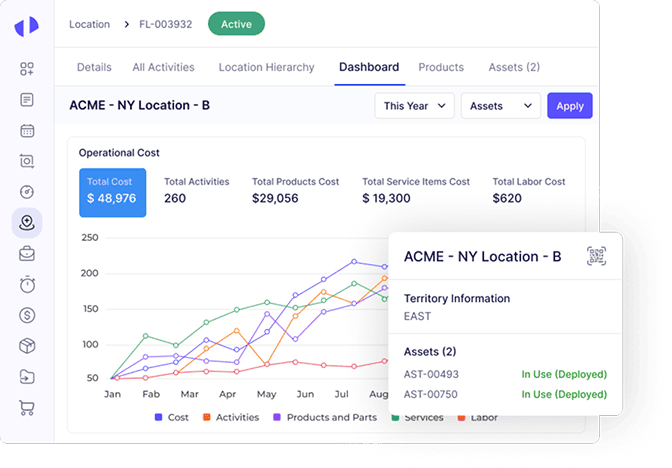
Effortlessly manage complete information about all school facilities and stakeholders, including staff, teachers, and external service providers, from an accessible location. Our school maintenance management solution helps easily track and manage maintenance tasks across different school campuses or facilities, ensuring targeted and efficient service delivery.
Dashboard shows operational cost, total activities, and product cost.

Assets and Equipment Management

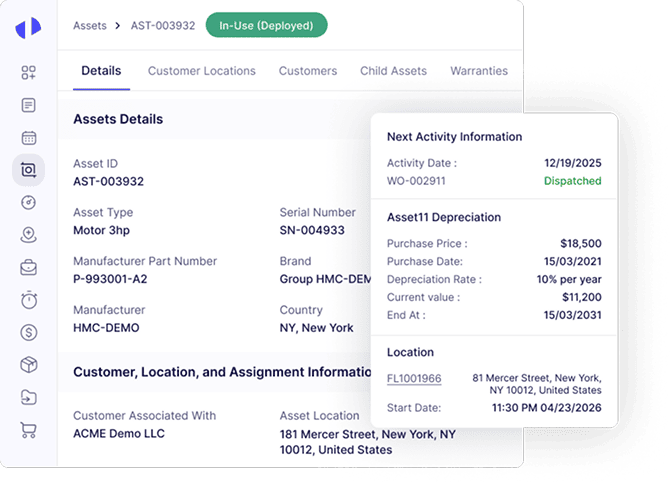
Maintain a comprehensive database of all school assets, including classroom equipment, HVAC systems, and technology resources, with detailed records of specifications and maintenance history. With our tool, you can easily monitor the entire lifecycle of assets from acquisition to disposal, thereby strategically executing maintenance planning and budgeting for replacements.
Asset details screen with next activity information and depreciation data.

Service Request Management

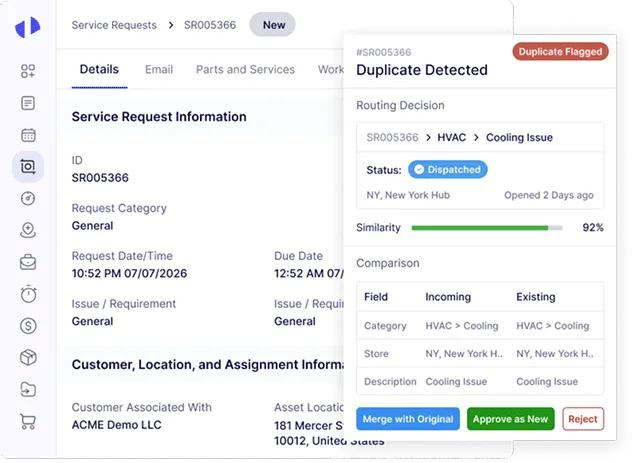
Enable teachers and staff to easily submit maintenance requests through a user-friendly portal, thus promptly reporting and addressing issues. With our tool, you receive instant notifications for new service requests, which allows for swift action to resolve issues affecting school operations or safety.
Service request details page with duplicate detection, similarity score, resolution, and field comparison.

Work Order Management

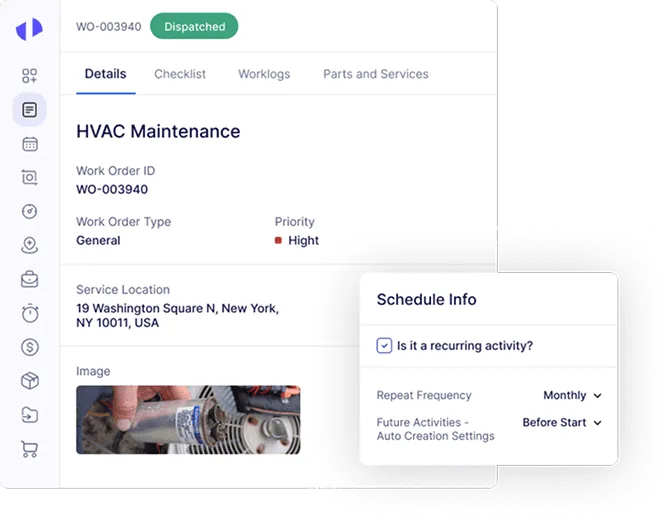
Convert service requests into work orders automatically, assigning them to the appropriate maintenance personnel with all the necessary details. Our facilities management software for schools provides real-time updates on work order statuses, and keeps all stakeholders informed about progress and expected completion times.
HVAC work order details showing schedule info and recurring activity checkbox.

Scheduling and Dispatch

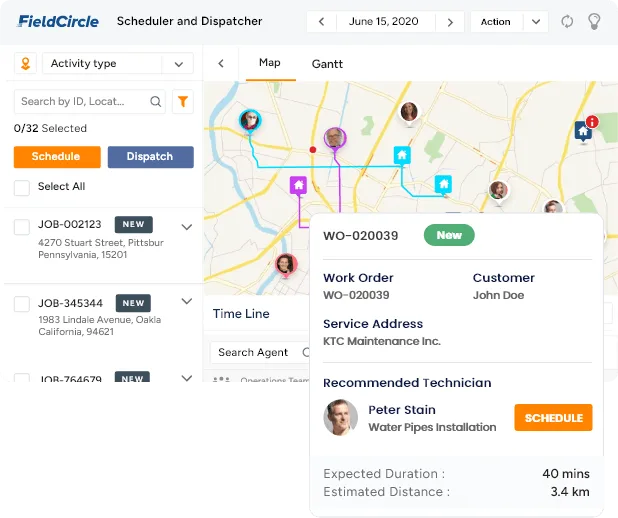
Leverage intelligent scheduling tools to assign maintenance tasks based on priority, technician availability, and location proximity. By using our tool, you are assured of dispatching your maintenance teams efficiently, giving them perfect access to work orders, location details, and required tools via mobile devices.
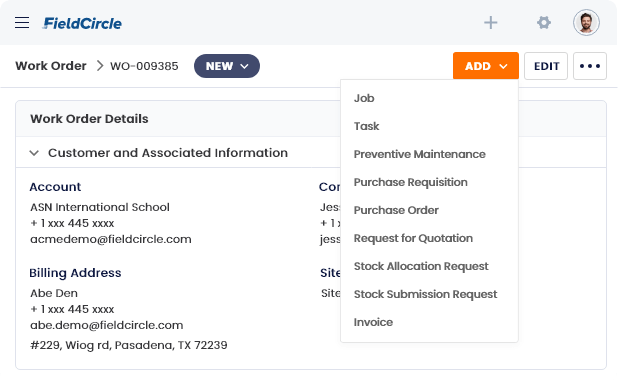
FieldCircle interface displays a dropdown menu for selecting work order job types.

Preventive Maintenance

Create and implement preventive maintenance schedules for critical assets to avoid unexpected failures and extend asset life. Using Zapium’s school maintenance system, you receive automated reminders for upcoming maintenance activities, no task goes overlooked and all equipment remains in optimal condition.
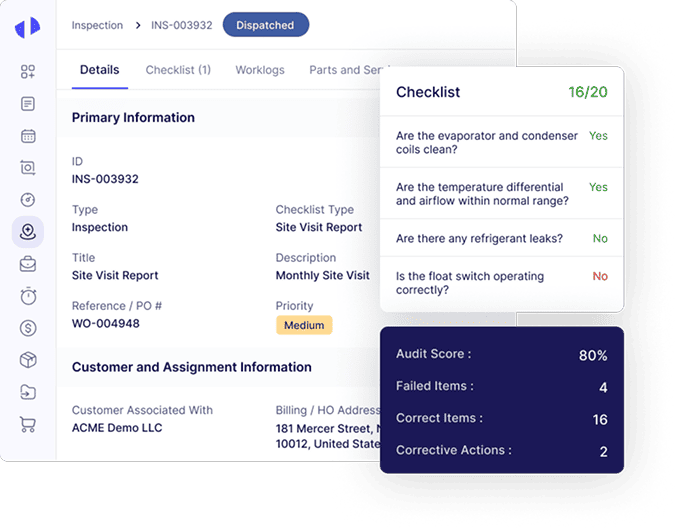
Computerized maintenance management screen displays inspection details for asset INS-003932, including site visit report data, customer assignment, checklist results,.

Inspection Management

Schedule regular inspections of school facilities and equipment to ensure compliance with safety standards and operational efficiency. Maintain detailed records of all inspections, including findings, corrective actions taken, and follow-up requirements, supporting compliance and continuous improvement.
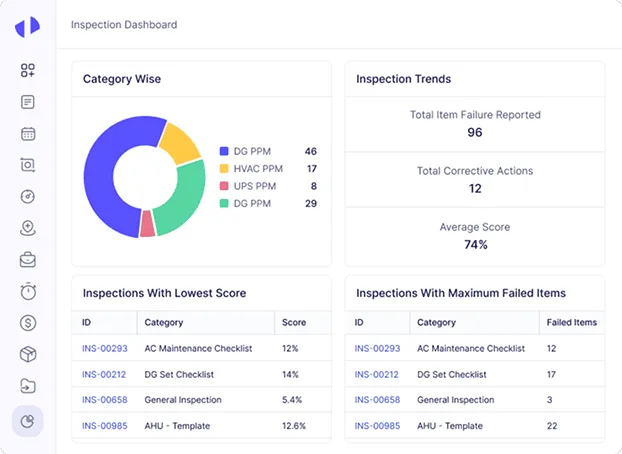
Category wise pie chart with inspection trends and scores displayed.

Checklist Template Management

Develop and manage customizable checklist templates for various maintenance and inspection activities, ensuring consistency and thoroughness in task execution. Use digital checklists to streamline task completion, allowing maintenance staff to mark off completed items in real-time and submit reports electronically.
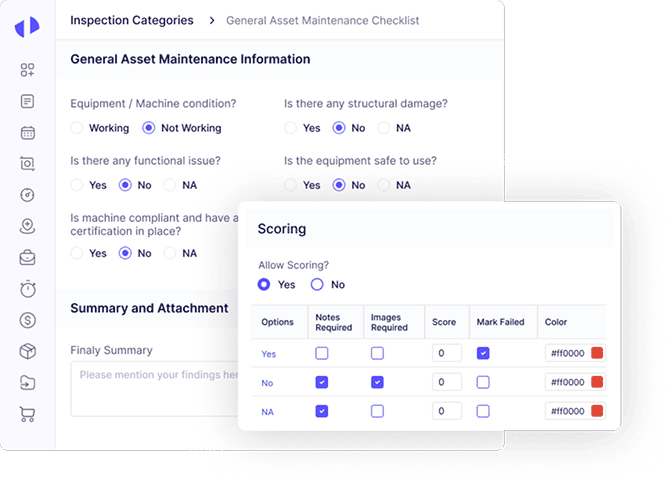
Asset maintenance inspection checklist with scoring.

Technicians and Crew Management

Maintain detailed profiles for each maintenance technician and crew member, including qualifications, skill sets, and certifications, to match task requirements effectively. Dynamically allocate and adjust workloads among technicians and crews based on availability, expertise, and location, ensuring efficient task distribution, so that each maintenance task gets addressed in time.
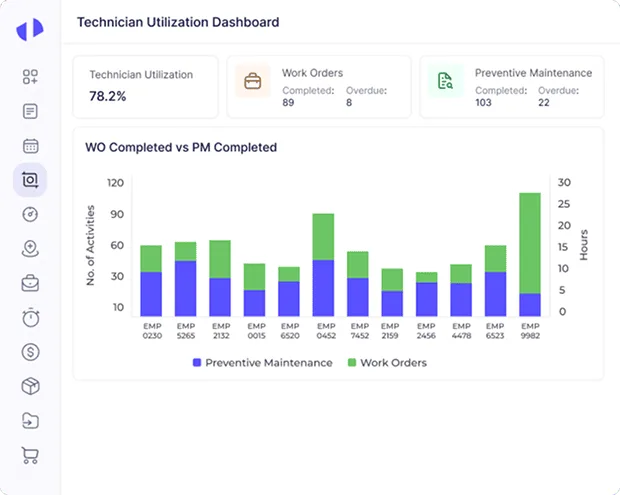
Technician Utilization Dashboard with utilization percentage and bar chart. Alt: "Technician utilization dashboard showing 78.2% and work order vs PM completed bar chart.".

Time-tracking and Timecards

Make use of automated time-tracking to accurately log hours worked by maintenance staff, supporting fair compensation and workload management. By implementing the digital timecard feature of our tool for easy clocking in and out, directly from mobile devices, you overcome the need for paperwork and also witness streamlining of payroll processes.
FieldCircle scheduler displaying work order details on map for scheduling.

Inventory and Supplies Management

Keep track of inventory levels for maintenance supplies, parts, and tools, with alerts for low stock to prevent delays in repairs. Our school and college maintenance software is the essential tool to manage orders for new supplies directly, and offers comprehensive insights into purchase history review and vendor performance evaluation.
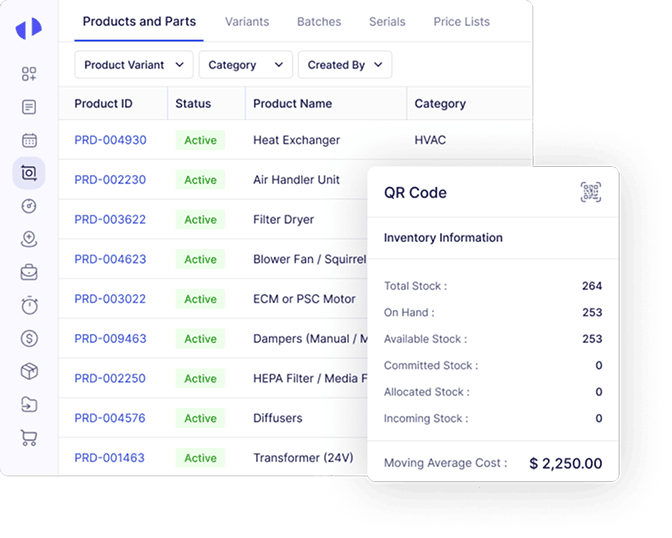
Product and parts inventory list shows active heat exchangers, air handler units, dryers, blowers, filters, dampers, and transformers with a QR code popup showing stock.

PO, RFQ, and Vendor Management

Generate and manage purchase orders for maintenance supplies and equipment, with automated workflows for approval and vendor submission. Offering a smooth workflow for the RFQ process, our tool allows schools and educational establishments to solicit and compare bids from multiple vendors directly within the system, which assists them in roping in the best vendors.
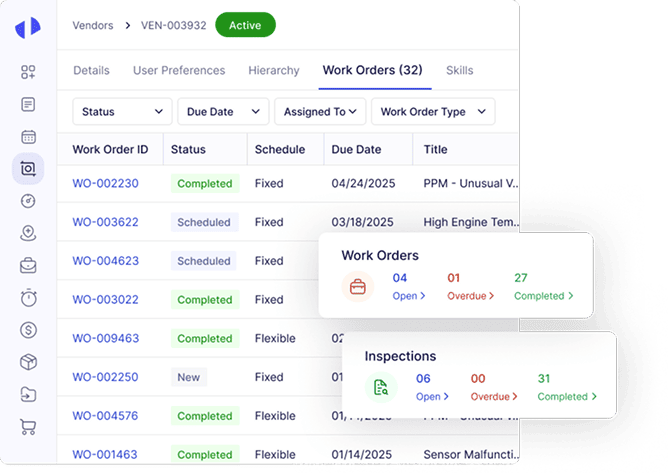
Work orders list displayed on dashboard interface.

Contract and SLA Management

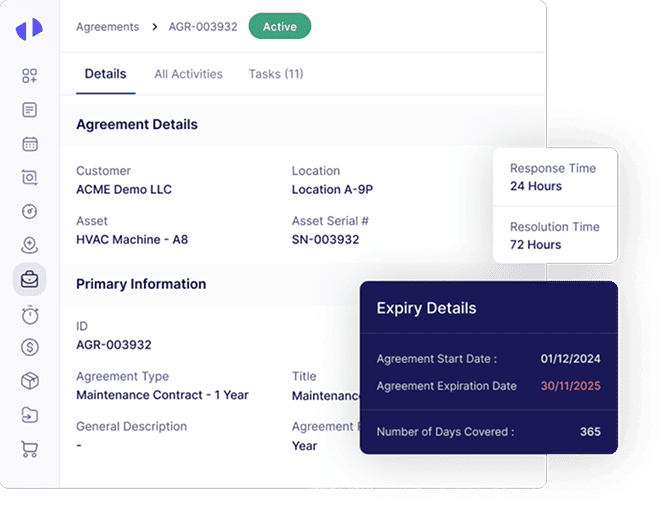
Maintain a digital repository of all maintenance-related contracts, including service level agreements (SLAs), warranties, and vendor contracts. With smart features to monitor compliance with SLAs, you can track and tap if vendors and service providers meet agreed-upon standards and timelines, and receive alerts for contract renewals and expirations.
Agreement details page showing customer, asset, and expiry information.

Invoice and Expense Management

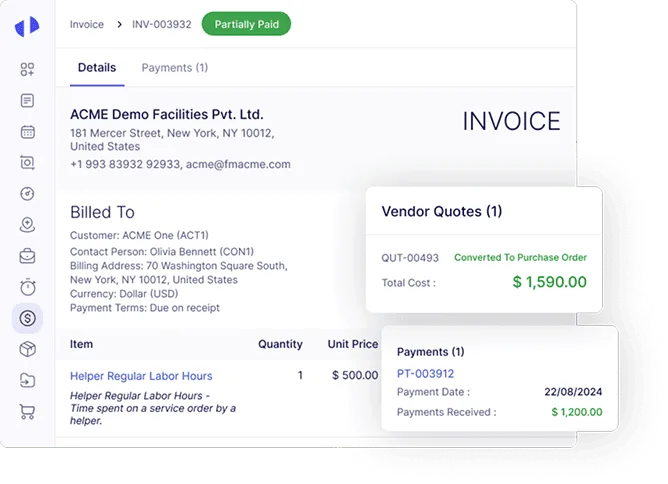
Benefit from automated invoice processing. With capabilities for digital submission, approval, and payment tracking, our maintenance management software for education helps categorize and track all maintenance-related expenses, thus providing a clear picture of budget utilization and aiding in financial planning for your educational establishment.

Invoice screen for ACME Demo Facilities Pvt. Ltd. displays billing details, invoice total, vendor quotes, and payment status.

Reports and Dashboards

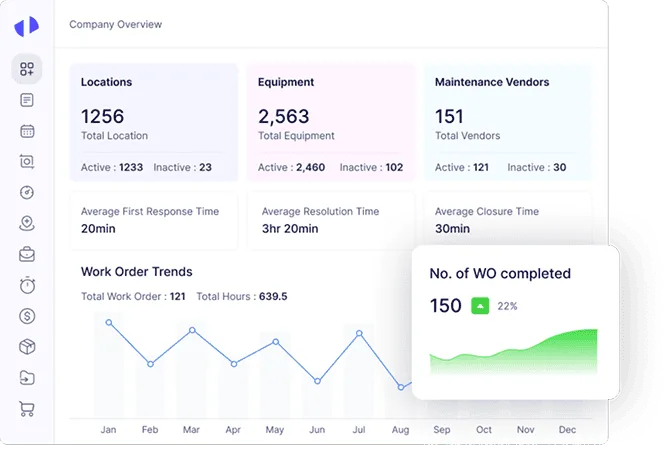
Generate customizable reports on various aspects of maintenance operations that range from work order completion rates to expense breakdowns. By offering interactive dashboards to visualize data on maintenance activities, asset health, and operational performance, supporting informed decision-making, our tool serves as a dedicated analytics application for maintenance monitoring.
HVAC company overview dashboard showing locations, equipment, vendors, work order trends, and completed count.

Full Mobile Accessibility and Customer Hub

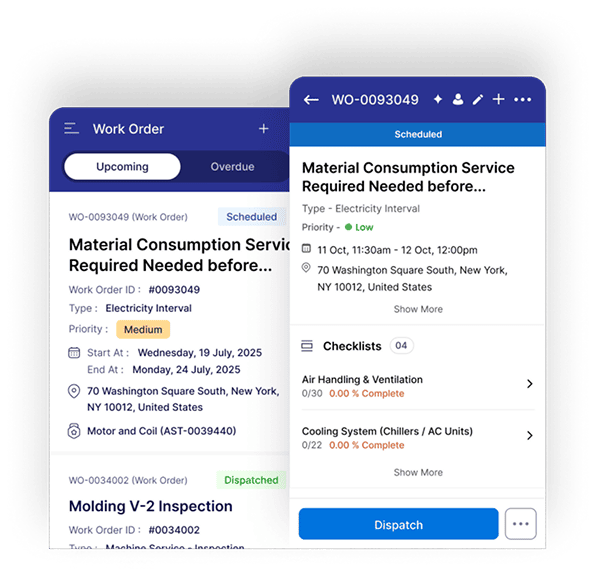
Offering flexibility to and improving response times, our tool serves as a customer hub for teachers and staff to submit maintenance requests, view the status of reported issues, and communicate directly with the maintenance team, which promotes transparency and garners stakeholder satisfaction.
Mobile work order app shows a material consumption service request, scheduled timing, location, checklist status, and a dispatch action button.

Facilities Like Yours are Seeing These Results With Our School Maintenance Software

Success Stories Led by Our School Maintenance Software

Discover the remarkable impact of Zapium as our trusted clients share their success stories and client feedback on how they have transformed their service operations.

Security & Privacy

Secure and Ready to
Help You Scale

Top-rated on G2 for great customer support

Based on 150+ reviews

Frame 1000004830
Frame 1000004830
Frame 1000004830
Frame 1000004830
Frame 1000004834
Software Advice badge awarding best customer support for 2026.

Secure, Trusted and Ready to Help You Scale

Designed with security at its core, enabling seamless and confident scaling as your operations grow.

Iso
Aicpa
Certified company

Top-rated on Capterra for Ease-of-use

Based on 100+ reviews

Frame 1000004830
Frame 1000004830
Frame 1000004830
Frame 1000004830
Frame 1000004834
Capterra badge displaying Best Ease of Use 2026 award.

Get Started

Ready to Run Tighter Ops and Win More Contracts?

Learn how your business can use Zapium’s School Maintenance Software to achieve more efficient, transparent, and profitable service operations.

Frequently Asked Questions (FAQs)

Quick answer to questions you may have.


What is School Maintenance Software?

School Maintenance Software is a specialized software solution designed to streamline maintenance operations within educational institutions. It encompasses a wide range of features and functionalities around facility management, asset tracking, preventive maintenance scheduling, and work order management. By centralizing maintenance tasks and data, school maintenance software helps schools and universities offer a conducive learning environment for students and staff.

The cost of our school maintenance software will vary based on factors such as the size of the institution, the scope of features required, and customization or integration needs. To obtain accurate pricing information for your specific requirements, it is recommended to get a personalized quote from our sales team. We offer transparent and budget-friendly pricing plans to suit the financial needs of every educational establishment.

Majority of integration support is already integrated into our school maintenance management system and is included in the standard package. However, if you require integration with a specialized application, the cost will be determined based on the complexity of the integration process. For more information on integration costs, our experts will provide you with a detailed breakdown upon request.

Yes, Zapium provides comprehensive training for new users to help them get up to speed quickly and effectively. From basic functionality to advanced features and best practices, these training sessions are designed to cover all aspects of using Zapium’s software. We offer multiple options such self-paced learning, live webinars, and personalized sessions, covering the whole spectrum of our tool.

Schedule a Demo

By submitting your details, you agree that we may contact you by call, email, and SMS and that you have read our terms of use and privacy policy.

Start Free Trial